The experience first
What does FPV actually feel like?
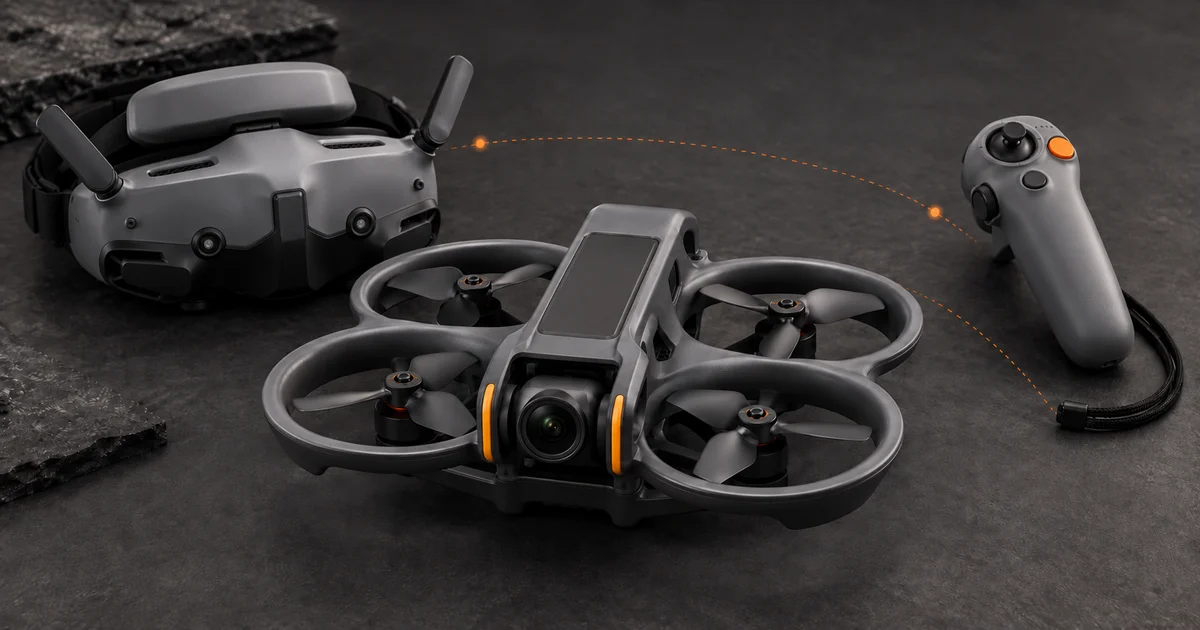
Forget watching a small aircraft move across the sky from the ground. Avata 2 puts the camera view inside the goggles, so a low pass over an open field or a banking turn feels closer to an action sequence than a traditional aerial shot. DJI makes that experience unusually approachable with Motion 3 controls and integrated propeller guards. It does not remove the difference between steering with motion controls and mastering traditional Manual FPV, and it does not make the route safe automatically. Buy it for immersive movement; skip it for calm photography, long hovering sessions, or the cheapest repairable freestyle setup.
Current eBay listings
DJI Avata 2
As an eBay Partner, DroneReviewed may earn a commission if you buy through these links.
Prices and availability can change.
Independent flight footage
See the movement before judging the specifications
This independent review includes real Avata 2 sample footage and shows the difference between reading about FPV and seeing the aircraft move through a route. The video creator's own disclosures and links apply.
Video: Air Photography on YouTube.
The useful version
Why the Avata 2 feels different
What makes it thrilling
- Goggles 3, O4 transmission, and the wide stabilized camera create a convincing low-latency view and footage that is much easier to use than video from many DIY beginner FPV builds.
- RC Motion 3 makes takeoff, turning, braking, and basic Easy Acro moves approachable without asking a new pilot to master full manual control immediately.
- Integrated propeller guards, 46 GB of usable internal storage, and a simpler battery design make the complete system practical to carry and reset between flights.
What the goggles do not solve
- The advertised 23-minute endurance is a controlled-condition maximum. Fast acceleration, repeated climbs, wind, and acrobatics can cut practical sessions sharply.
- Motion control is accessible but not the same skill as flying a standard two-stick FPV controller in Manual mode.
- The guards protect the propellers, not the entire aircraft or the people and objects around it. Avata 2 still needs space, judgment, a visual observer where required, and a conservative learning plan.
Easy FPV is still FPV
The Avata 2 lowers the first barrier brilliantly. Put on the goggles, point with RC Motion 3, squeeze the trigger, and the aircraft responds in a way that feels closer to aiming than to operating two independent control sticks. A prominent brake control can stop the movement and return the aircraft to a stable hover.
That is what DJI means by accessible FPV. It does not mean the route becomes safe automatically. The pilot still sees through a forward camera with limited awareness outside the frame. Speed changes braking distance. Goggles reduce direct awareness of people approaching the flight area. Propeller guards help with glancing contact, but they do not protect the camera, battery, top of the aircraft, or whatever the drone hits.
Easy Acro is another useful shortcut. It can perform preset flips, rolls, and drifts without full manual control. The result is fun and visually dramatic. It is not the same as learning to manage throttle, attitude, and recovery with FPV Remote Controller 3 in Manual mode.
The camera is built for motion, not hovering perfection
Avata 2 footage looks convincing because several parts work together: a very wide lens, a 1/1.3-inch sensor, a one-axis mechanical gimbal, and electronic stabilization. The wide field of view gives the software room to smooth movement while preserving the sensation of speed.
This is different from a conventional three-axis camera drone. An Air or Mini is designed to hold a composed frame while the aircraft moves quietly around it. Avata 2 is designed to make movement itself part of the image. It can produce stable-looking 4K video, but it is not the natural choice for level horizons, careful still photography, or long stationary observation.
The 4K/100 slow-motion figure is useful for fast passes and action. It also requires more light, storage, and editing than ordinary playback. The camera can record a flat D-Log M profile, but color latitude does not turn the single wide lens into a multi-camera production system.
The complete system is the product
Buying only the aircraft makes sense mainly for someone who already owns confirmed compatible goggles and controls. Most first-time buyers need a combo. Goggles 3 provide the immersive view and can use pass-through cameras to check the surroundings without removing the headset. RC Motion 3 is the accessible controller supplied in common packages. FPV Remote Controller 3 is a separate decision for conventional stick control and Manual mode.
Compatibility is broader than the current package names suggest, but it is generation-specific. DJI documents Goggles 3 and Goggles N3 with RC Motion 3 or FPV Remote Controller 3. It also documents Goggles 2 and Goggles Integra with RC Motion 2 or FPV Remote Controller 2. The controller and goggles must belong to the supported pairing; mixing a second-generation controller with third-generation goggles is not the documented route.
Use the FPV goggles compatibility guide to check the video link and headset before treating a used or standalone goggles listing as a bargain.
This is where a simple aircraft price becomes misleading. Batteries, a charging hub, controller choice, goggles, corrective lenses if needed, storage, and a protective bag affect the real experience. Compatibility can also change through firmware, so an older goggles or controller listing should be checked against current DJI support before purchase.
The 46 GB of usable internal storage is genuinely helpful because an FPV session can end quickly if a card is missing. It does not remove the need to move files, check remaining space, and verify recording before launch.
The 23-minute claim is not a 23-minute FPV session
DJI measures its maximum under controlled conditions. FPV flying often does the opposite of an efficiency test: repeated acceleration, climbing, braking, turning, wind correction, and high-power recovery. Digital Camera World’s reviewer reported roughly eight minutes during hard flying, which illustrates how widely use can change the result without turning one flight into a universal benchmark.
The practical response is not to replace DJI’s number with another magic number. Plan shorter sessions, return early, watch voltage and warnings in the goggles, and let batteries cool before charging. A multi-battery kit matters more for Avata 2 than the headline maximum suggests because each flight invites more power changes than a calm camera orbit.
Motion 3 or FPV Remote Controller 3?
| Decision | RC Motion 3 | FPV Remote Controller 3 |
|---|---|---|
| Learning curve | Faster start | Steeper start |
| Control style | Point, trigger, brake | Two sticks with conventional FPV inputs |
| Easy Acro | Designed around preset moves | Manual skill is the point |
| Manual mode | No full traditional Manual control | Yes, after setup and practice |
| Best fit | Immersive filming and accessible fun | Pilots who want deeper FPV control |
Motion 3 is not a fake controller. It is a different control system optimized for accessibility and camera movement. FPV Remote Controller 3 is not automatically better for a new owner. It becomes the better choice when learning traditional FPV stick control is part of the goal, preferably after simulator time and a deliberately staged practice plan. Owners using Goggles 2 or Goggles Integra should check the documented second-generation controller pairing instead of assuming the third-generation table applies to their equipment.
The immersive answer
Who should buy the Avata 2?
Buy the Avata 2 when immersive movement is the creative goal and a complete DJI system is worth paying for. It is easier to start than a traditional manual FPV build, records useful stabilized footage, and makes close dynamic routes approachable. Skip it if the job is stable photography, long calm flights, maximum repairability, or the lowest total cost. Motion 3 is a friendly doorway, not proof that FPV risk and skill have disappeared. The honest purchase includes the goggles, controller choice, practice space, observer requirements, and batteries, not just the aircraft.
SpecificationsWeight, camera, battery, controller and compatibility
Reference
Specifications
Checked for US
- Manufacturer
- DJISources DJI
- Model
- DJI Avata 2Sources DJI
- Weight
- 377 g takeoff weight; Approximate standard takeoff weightCondition: US recreational operation requires registration at this weight; verify current rules and the final ready-to-fly configuration.Sources DJI, Federal Aviation Administration
- Camera
- 1/1.3-inch CMOS with 155-degree field of view; 12 MP; 4K/100fps in 16:9; 4K/60fps in 4:3; 1-axis mechanical gimbal with RockSteady and HorizonSteady electronic stabilizationSources DJI, DJI
- Battery
- DJI Avata 2 Intelligent Flight Battery; 2150 mAh; 31.7 Wh; manufacturer claim: 23 minCondition: The 23-minute figure is a controlled-condition maximum. Aggressive FPV flying can reduce usable time substantially.Sources DJI
- Controller
- Package-dependent: DJI RC Motion 3; DJI FPV Remote Controller 3 sold separately in common bundlesSources DJI, DJI
- Compatibility
- Controllers: DJI RC Motion 2, DJI RC Motion 3, DJI FPV Remote Controller 2, DJI FPV Remote Controller 3; Batteries: DJI Avata 2 Intelligent Flight Battery; Apps: DJI Fly, DJI Assistant 2 (Consumer Drones Series); Requirements: DJI Goggles 3 or Goggles N3 with RC Motion 3 or FPV Remote Controller 3, DJI Goggles 2 or Goggles Integra with RC Motion 2 or FPV Remote Controller 2, Visual observer and current local FPV operating rules, Current firmwareSources DJI, DJI, DJI, DJI, Federal Aviation Administration, Federal Aviation Administration
- Support status
- current; Current product, specifications, support, firmware, and downloads pages were available when checked.Sources DJI, DJI
- Official US availability
- available; The US DJI product page displayed an official purchase path when checked; exact combo stock can change.Sources DJI
Sources and editorial noteOfficial documentation and independent reviews
Sources
Where the facts came from
Manufacturer documentation was used for specifications. Independent reviews were used to understand the practical strengths and limitations.
- DJI Avata 2, DJI. Manufacturer source. Checked . Used for the current aircraft, goggles, controller, camera, safety, and purchase claims published by DJI.https://www.dji.com/avata-2
- DJI Avata 2 specifications, DJI. Manufacturer source. Checked . Used for weight, camera, battery, storage, controller, transmission, and compatibility facts.https://www.dji.com/avata-2/specs
- DJI Avata 2 downloads, DJI. Manufacturer source. Checked . Official home for current manuals, firmware notes, support software, and LUTs.https://www.dji.com/avata-2/downloads
- DJI Avata 2 FAQ, DJI. Manufacturer source. Checked . Used for the documented goggles and controller pairings, internal storage, obstacle-sensing limits, and Manual mode requirements.https://www.dji.com/avata-2/faq
- Recreational Flyers & Community-Based Organizations, Federal Aviation Administration. Government source. Checked . Used for the current US recreational registration threshold and baseline operating requirements.https://www.faa.gov/uas/recreational_flyers
- Advisory Circular 91-57D, Federal Aviation Administration. Government source. Checked . Used for the current visual-line-of-sight and co-located visual-observer guidance for recreational FPV flying.https://www.faa.gov/documentLibrary/media/Advisory_Circular/AC_91-57D.pdf
- DJI Avata 2 review: FPV flight has never felt more immersive, TechRadar. Independent source. Checked . Used for independent observations on Goggles 3, image quality, Motion 3 accessibility, manual-control appeal, and system value.https://www.techradar.com/cameras/drones/dji-avata-2-review
- DJI Avata 2 review: The FPV drone for all learns new tricks, Digital Camera World. Independent source. Checked . Used for independent observations on handling, Motion 3, Easy Acro, camera stabilization, kit design, and hard-flight endurance.https://www.digitalcameraworld.com/reviews/dji-avata-2-review
- I flew the DJI Avata 2 for an entire month: what I wish I knew beforehand, Tom's Guide. Independent source. Checked . Used as a long-use independent perspective on FPV learning, speed, controller choice, and practical limitations.https://www.tomsguide.com/cameras-photography/drones/i-flew-the-dji-avata-2-for-an-entire-month-heres-what-i-wish-i-knew-beforehand
- DJI Avata 2 - Incredible New Features - Full Review, Air Photography. Independent source. Checked . Embedded as an attributed independent review with sample Avata 2 footage so readers can see the FPV effect.https://www.youtube.com/watch?v=oyibzWjMSjM
Editorial disclosure: This review combines current DJI documentation with several independent reviews. DroneReviewed is not claiming ownership, original flight tests, or measurements. Availability, firmware, compatibility, package contents, and FPV operating rules can change, so check the complete system before buying.