Direct answer
Use the battery manual as the storage specification.
Let the pack cool after flight, inspect it before charging, and follow the aircraft maker's storage and self-discharge instructions for that exact battery. Keep it dry, away from heat and conductive objects, and easy to inspect. Do not substitute a universal charge percentage for model-specific guidance.
Begin with the exact battery system
Drone batteries do not all use the same charger, storage behavior, temperature limits, or status indicators. Even batteries that look similar can belong to different aircraft generations or charging hubs. Start with the manual for the aircraft, battery, and charger you actually own.
Record the model name and keep the relevant manual link with the kit. If the manufacturer provides a storage mode or automatic self-discharge setting, learn what it does and when it begins. Do not copy a charge target from a different brand or battery family simply because both packs are described as lithium batteries.
This page deliberately avoids a universal storage percentage. The correct target and the way it is reached are product-specific facts.
Inspect before every charge
Look at the case, contacts, and surrounding area before connecting power. Stop and use the manufacturer’s support or disposal guidance if a pack is swollen, leaking, cracked, unusually hot, physically damaged, or has contaminated contacts. Do not press a swollen pack back into shape or try to make it fit an aircraft or hub. Use the swollen-battery stop-use checklist instead of attempting another charge.
Keep charging contacts clean and dry. Metal objects can bridge exposed terminals, so loose batteries should not share a container with keys, coins, tools, or other conductive items. Use the terminal protection or storage method specified by the manufacturer, and keep the pack where accidental pressure or puncture is unlikely.
An inspection is not proof that a battery is healthy. It is a repeatable way to catch visible reasons not to charge or fly.
Let the pack cool before charging
A battery can be warm after flight. Follow the manual’s charging temperature range and wait until the pack is within that range before connecting it. Do not accelerate cooling with water, a refrigerator, or another improvised method.
Use the specified charger or charging hub on a stable, dry surface. Keep the charging area uncluttered so heat, odor, swelling, or an error indication is easier to notice. Follow the manufacturer’s instructions on whether the battery may remain in a hub after charging and how unattended charging should be handled. The safe charging guide turns those checks into a separate connection-to-disconnection sequence.
If charging behaves differently from what the manual describes, disconnect only when it is safe to do so and follow the manufacturer’s support instructions. Repeatedly reconnecting a battery is not a diagnosis.
Prepare the battery for inactivity
Start by considering how long the battery will sit unused. A battery you plan to use again soon may have different instructions from one that will sit unused for weeks or months. Use the manufacturer’s stated storage behavior rather than leaving every pack fully charged indefinitely.
Some intelligent batteries manage charge automatically after a period of inactivity. That feature does not remove the need to check the pack. Note the storage setting, confirm the battery can release heat as instructed, and inspect it periodically for physical changes or unexpected loss of charge.
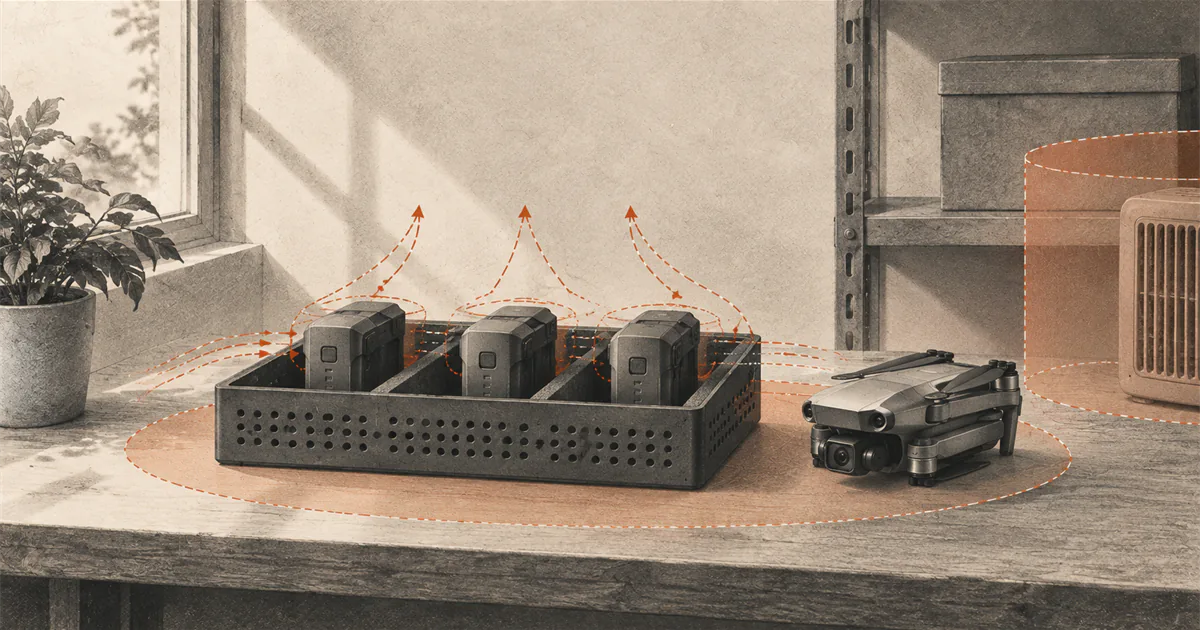
Store batteries in a dry location away from direct sunlight, heaters, hot vehicles, and large temperature swings. Keep them away from flammable materials and arranged so a damaged pack can be noticed without moving an entire stack.
Before a temperature-sensitive session, use the exact-model guidance in the cold-weather flight guide or hot-weather flight guide. An operating range and a charging range are separate limits.
Keep records simple
A small label or kit log can reduce guesswork. Record the battery identifier, purchase date if known, last use, and any unusual warning or physical change. For multiple packs, use identifiers that match what you see in the aircraft app or charging workflow.
Do not fly with a battery if its condition is uncertain. A record does not make the pack safe, but it prevents a warning seen on one battery from being forgotten or assigned to another.
Treat air travel as a separate check
Everyday storage guidance is not a packing rule for passenger aircraft. In the United States, the FAA applies separate requirements to spare lithium batteries, damaged or recalled batteries, terminal protection, and carry-on placement. Airline policies and rules in other countries can add further limits.
Check the current FAA PackSafe guidance and your airline’s requirements before travel. Confirm the battery’s watt-hour rating from the battery label or manufacturer documentation. Do not assume that a case used at home automatically meets the requirements for air travel. Use the drone-battery air-travel checklist for carry-on placement, terminal protection, airline approval, and gate-check handling.
This boundary matters because a well-maintained flight battery can still be packed incorrectly. Storage, charging, transport, and disposal are separate tasks, each with its own requirements and instructions.
Before flying again, inspect the pack through the beginner drone preflight checklist and check the current wind and gusts for the operating area.
Sources
Check the underlying guidance.
These records support the factual boundaries used in this guide. Product-specific instructions still control for an individual battery system.
- DJI Mini 4 Pro User Manual, DJI. Manufacturer source. Checked . Used as a current example of model-specific charging, inspection, temperature, and self-discharge instructions.https://dl.djicdn.com/downloads/DJI_Mini_4_Pro/20240115/DJI_Mini_4_Pro_User_Manual_EN.pdf
- PackSafe for Passengers: Lithium Batteries, Federal Aviation Administration. Government source. Checked . Used only for the US air-travel boundary, not as an everyday storage manual.https://www.faa.gov/hazmat/packsafe/lithium-batteries
Editorial disclosure: This guide synthesizes manufacturer instructions and FAA travel guidance. DroneReviewed is not claiming an original battery test.