Direct answer
Four inputs, four different jobs.
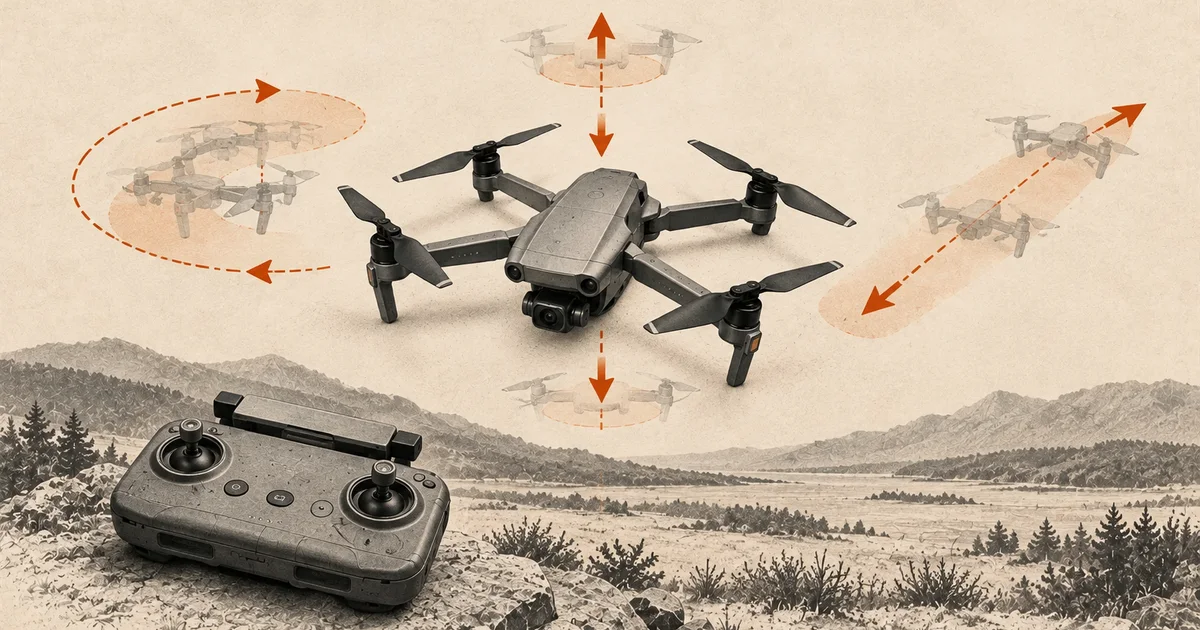
Throttle controls climb and descent, yaw turns the nose left or right, pitch tilts the drone forward or backward, and roll tilts it left or right. On a stabilized drone in Mode 2, the left stick controls throttle and yaw; the right stick controls pitch and roll. To move right from a nose-away hover, use right roll. To turn the nose left without commanding sideways movement, use left yaw with pitch and roll centered.
The Mode 2 stick map
This map is for a conventional two-stick controller set to Mode 2. DJI’s Mini 4 Pro manual shows this mapping, but controllers can use other modes or custom settings. Verify the active mode on your own system before using the map.
| Control | Stick input | Response on a stabilized drone |
|---|---|---|
| Throttle | Left stick up/down | Climb or descend |
| Yaw | Left stick left/right | Turn the nose left or right |
| Pitch | Right stick up/down | Tilt and move forward/backward relative to the nose |
| Roll | Right stick left/right | Tilt and move sideways relative to the nose |
Pitch, roll, and yaw are rotations about different aircraft axes. A stabilized flight controller turns your stick inputs into the expected movement; you are not setting a fixed tilt angle directly. In manual or acro modes, the relationship between stick position, attitude, throttle, and motion is different.
What does the left stick control on a drone?
In Mode 2, the left stick controls throttle and yaw: up/down commands climb or descent, while left/right turns the nose. The right stick controls pitch and roll: forward/backward movement and sideways movement relative to the aircraft’s nose. Check your controller mode before using this mapping.
How to move right from a hover
With the nose facing away from you, the aircraft’s right is also your right. On a Mode 2 controller, a small right-stick movement to the right commands roll and sideways movement. Keep yaw centered if you want the nose to keep pointing the same way.
For a drone with functioning position hold, return the stick toward center to end the command and let the aircraft brake or stabilize as its manual describes. Observe the aircraft before another input. Centering sticks is not a universal guarantee that every drone will stop or hold position.
If the nose faces you, the aircraft’s right appears on your left. The controls did not swap; your viewpoint changed. Use the nose-in orientation guide before practicing that view.
How to turn the nose left without moving sideways
Use left yaw: move the left stick left in Mode 2, while keeping pitch and roll centered and avoiding unintended up/down input. The nose turns counterclockwise when viewed from above. This changes heading rather than commanding sideways travel.
Position hold may keep a supported drone near the same point while it turns, but wind, positioning quality, and flight mode can still produce drift. Yaw is not a promise of zero movement. If you see drift, reassess the conditions and aircraft behavior before adding more corrections.
Forward follows the nose
Forward pitch means forward relative to the aircraft, not toward the top of your screen or away from you in every situation. Turn the nose 90 degrees and its forward direction turns with it. In a nose-in hover, forward movement is toward the pilot.
Learn the nose direction first, then choose the axis. If your goal is sideways motion, start with roll. If your goal is a new heading, start with yaw. Mixing the two before you understand them makes the result harder to predict.
Throttle and a stable hover
On supported stabilized drones, an up/down throttle input commands climb/descent and a centered stick may hold altitude. DJI documents centered-stick hover for the Mini 4 Pro in supported positioning conditions. That behavior should not be assumed for a simple toy drone, FPV acro aircraft, or a degraded positioning state.
There is no universal pitch angle for hovering a drone of a given weight. Wind, aircraft design, flight mode, and positioning affect the attitude required. Use the documented stabilized controls and the steady-hover drill, rather than trying to copy a tilt angle from a search result.
Practice one axis at a time
Start in a safe practice area with the aircraft nose-away, a completed preflight check, and a known landing point. This short progression adapts Virginia Tech’s separate control and hover exercises:
- Use the takeoff and landing sequence to establish a predictable hover.
- Make one small sideways roll input, end it, and observe the response.
- Once settled, try a small forward/backward pitch input without adding yaw.
- From another stable hover, turn the nose a little with yaw, then pause and identify the new forward direction.
- Land before orientation becomes confusing, corrections grow, a warning appears, or the area changes.
The useful result is recognizing the input and its effect. You do not need a long flight, a large circuit, or simultaneous stick movements to learn that distinction.
Drone controls FAQ
Is yaw the same as moving left or right?
No. Yaw turns the nose. Roll produces left/right tilt and sideways movement on a stabilized multirotor. A curved flight path can combine yaw, pitch, and roll, but that is a later task.
Which stick makes a drone go forward?
In Mode 2, push the right stick forward to command forward pitch. Forward follows the drone’s nose, so check its orientation before moving.
Is pitch the camera angle?
Aircraft pitch is the drone’s forward/backward tilt. A camera gimbal can tilt independently, so a level-looking video frame does not tell you the aircraft’s attitude. The camera tilt control is separate from the flight stick mapping.
Do the controls reverse when the drone faces me?
The aircraft axes remain the same. In a nose-in view, the aircraft’s left appears on your right and forward movement comes toward you. Learn that perspective in a separate short orientation drill.
Can I use this map for every controller?
Use it for a verified Mode 2 two-stick setup. Mode 1, Mode 3, custom mappings, motion controllers, and phone interfaces can put the same functions elsewhere. The current aircraft and controller instructions determine the actual mapping.
Sources
Check the underlying guidance.
DJI supplies the exact-model Mode 2 mapping and flight-mode limits. Virginia Tech's training manual supports learning one control axis at a time. Check your own controller mode and aircraft manual before flying.
- DJI Mini 4 Pro User Manual v1.4, DJI. Manufacturer source. Checked . Exact-model example for controller modes, throttle/yaw/pitch/roll mapping, centered-stick behavior, and positioning limits. Linked from the current DJI downloads page.https://terra-1-g.djicdn.com/6189933d30024fc1b331bffe4fe41837/mini-4-pro/UM/DJI_Mini_4_Pro_User_Manual_en.pdf
- sUAS Manual Flight Exercises, Virginia Cooperative Extension, Virginia Tech. Independent source. Checked . Get Control of the Controller and hover exercises support axis terminology and simple, separate practice tasks. Its older regulatory summary and fixed training dimensions are not used here.https://www.pubs.ext.vt.edu/content/dam/pubs_ext_vt_edu/CNRE/cnre-149/CNRE-149.pdf
Editorial disclosure: Original explanatory diagrams based on manufacturer control mapping and an expert-reviewed training guide. This is a guide to stabilized consumer multirotors, not FPV acro instruction or a claim of hands-on testing.